SENU Terminal
Native cross-platform terminal, built on Tauri 2 and Rust.
- Role
- Engineering, Design
- Client
- Self
- Year
- 2026
- Stack
- tauri · rust · typescript
// notes
What it is
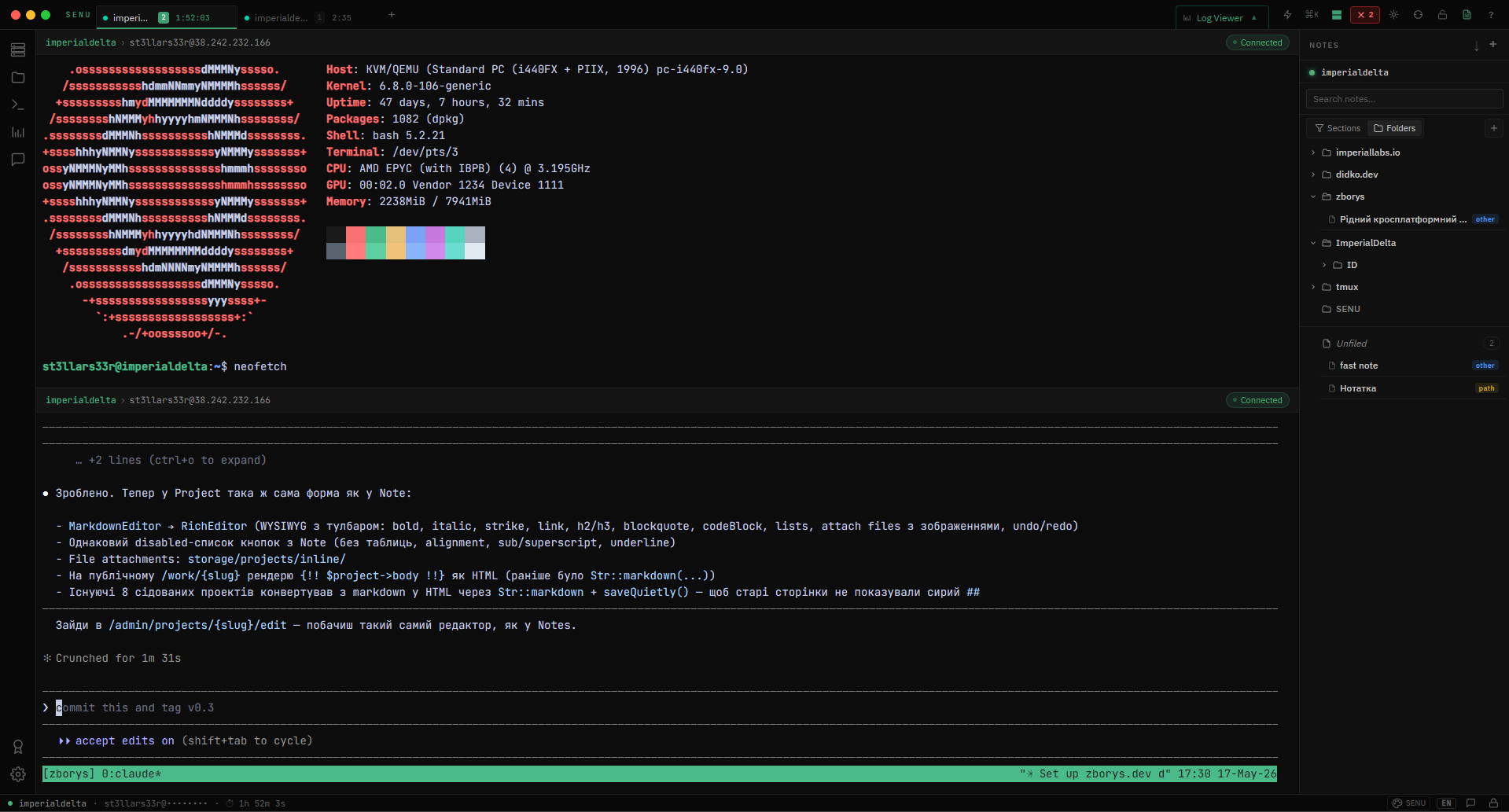
SENU is a native cross-platform terminal for people who manage more than one server. It supports SSH, Telnet, Serial, Local shell, and Docker connections in a single interface. On top of the terminal, it adds three things most existing clients don't have:
Server-bound Notes. Notes that live next to a specific connection. Open the server, see the notes for it. No more scattered
notes.txtfiles across your machine.Plugin-aware Log Viewer. A built-in viewer for log files with a plugin architecture, so different log formats can be parsed and rendered correctly without bloating the core.
End-to-end encrypted Chat. A chat layer that runs on top of the SSH server you're already connected to. X25519 + AES-256-GCM, ephemeral message keys, local cleanup on disconnect. Designed for two admins on the same server who want to talk about a working detail without leaving a trail in Slack. Currently in alpha.
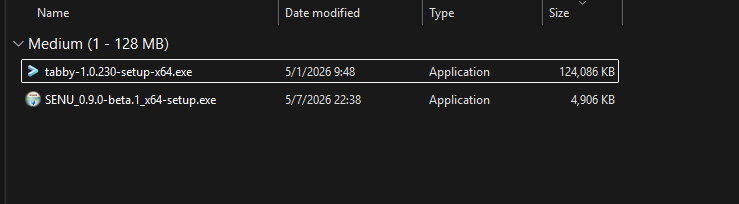
The binary is around 4.9 MB. The stack is Tauri 2 + Rust.
It's open source under Apache 2.0. The repo is at github.com/St3llArS33R/SENU. The website is senu.sh.
Current state: v0.9.0-beta.1, released May 2026.
The problem
If you manage servers as part of your job, you already know the shape of this problem. You SSH into a box. You do a thing. A week later you SSH back in and can't remember which folder, which config, which decision. Multiply that across 5, 10, 30 servers. Multiply that across the projects you're juggling. Your working memory leaks faster than you can refill it.
Existing terminals fall into two camps.
Camp one is the old-school terminal — fast, lean, no nonsense. iTerm2, Alacritty, Windows Terminal. They do exactly what a terminal should do. They also do nothing else. Want notes tied to a server? Open another app. Want to browse a log file with structure? Open another app. Want to chat with your teammate while you're both poking at the same box? Open another app. The terminal stays pure, and your workflow scatters across five windows.
Camp two is the modern terminal — feature-rich, slick UI, often Electron-based. Termius, Hyper, Warp. They try to bundle more into the experience. The problem is the cost: a 150-300 MB binary that eats RAM for breakfast and lags when you scroll fast. You install one of these on a 4 GB cloud instance and immediately regret it. The modern features came at the price of respecting the host machine.
I wanted the third camp. Modern features, sane binary size, no compromise on responsiveness.
The approach
SENU started as something else. The first version was an Electron + React application, positioned as a premium SSH client at $49/month, aimed at security professionals. The plan included a licensing architecture — BTCPay Server for crypto payments, hardware fingerprinting, JWT tokens for activation. A whole infrastructure for a paid niche product.
I spent a few months on that direction before doing an honest cost assessment. The legal and operational overhead alone — EV code signing certificates, Apple Developer registration, EU trademark, legal entity setup, VAT registration — would have cost over €2,000 upfront. That's reasonable if you have proven demand. I didn't. I had a hypothesis.
So I pivoted. Two changes at once:
Open source under Apache 2.0, dropping the licensing layer entirely.
Tauri 2 + Rust instead of Electron + React, dropping the bloat.
The audience also shifted. Instead of niche security pros at $49/month, the target became sysadmins, DevOps engineers, and anyone managing multiple servers — which is a much larger and more honest audience for what the tool actually is.
The Tauri migration was the most consequential technical decision. Electron renders your UI inside a bundled Chromium instance — that's where the +150 MB and the lag come from. Tauri uses the host OS's native webview, which is already there. You ship a small Rust binary that talks to a system webview, and you get a real desktop application without packaging a browser.
The result for SENU: ~4.9 MB binary instead of ~150 MB. RAM usage at idle: roughly a third of what an equivalent Electron build needed. Cold start measurably faster. None of these are vanity metrics — they're the difference between "I'll install this on my work server" and "no thanks."
Key decisions
A few of the choices behind the build that shaped what SENU is today.
Tauri over Electron — for the reasons above. Binary size, RAM, and respect for the host machine. Not a religious war about JavaScript vs Rust; a pragmatic call about deployment cost.
Rust on the backend, web stack on the frontend — Rust handles the heavy lifting (network, file IO, plugin loading), the frontend handles UI. Standard Tauri architecture, but worth saying explicitly: this isn't Rust-for-the-sake-of-it. The crypto and SSH layers want a language with strong guarantees. The UI doesn't.
A chat layer with a deliberately narrow threat model
The chat in SENU exists to solve one specific situation: a project team of 10 people sitting in the same office; two of them are working on something specific that doesn't need to go to the rest of the team; both are connected over SSH to the same server. They want to talk about it — right here, right now, without leaving a trail in Slack or Teams that would itself raise questions. That's the whole use case. The design follows from that, not from "let's build secure messaging."
The transport is files in /tmp/.senu/ on the shared server. Sticky bit, +world-write — you can write your own files, you can't delete other people's. When you disconnect, your side of the chat clears. When both leave, nothing remains on the server either. And if you want to leave no infrastructure trace at all, the exit ritual is rmdir /tmp/.senu/ — at which point the only thing left in any log is that two admins were on the server, which is a non-event.
Encryption sits on top: X25519 for key exchange, AES-256-GCM for messages, Ed25519 signatures over canonical message fields to prevent forgery. Each message uses an ephemeral key (forward secrecy); identity keys stay persistent per contact and look like CAYG+KPfa3mBDXMZerbJxfjMFmcnCqzHAZ7xtXhwT0c — a base64-encoded X25519 + Ed25519 pair. Key verification is out-of-band: you share your pubkey through another channel, the other side adds it manually. No central directory, no trust-on-first-use.
The threat model is explicit. A third admin who logs into the same server should not be able to read what we're saying. They can see the files exist — that's unavoidable in shared filesystem transport — but the contents are ciphertext. To compromise the conversation they'd need the public key first, and even with it, the cost of breaking the encryption should exceed whatever they'd learn from a working-chatter session. The goal isn't "unbreakable." The goal is "not worth breaking."
What the chat is not: it's not Signal. It hasn't had an independent cryptographic audit. The core flow — two users, basic exchange — works. Edge cases aren't all tested. It's not for conversations whose compromise would be critical. It's for the kind of working chatter that's useful to have alongside the terminal, and that you don't want a curious third admin on the box to read trivially.
A log viewer that's meant to explain what it's showing
This is the most architecturally interesting part of SENU and also the least finished — so I want to describe it as what it is, not what I'd like it to be.
The idea behind the log viewer is simple. Most tools for reading logs — tail, less, even big platforms like Splunk — are dumb terminals for text. They render lines. You're expected to recognize patterns by eye. After 30 minutes of staring at an nginx access log full of /admin/*, /wp-content/, /.git/credentials, /actuator/health, your gaze starts to slide off the text. You miss the things you were actually looking for.
What SENU tries to do instead is classify lines as it renders them. A request to /admin/config.js shows up tagged RECON — "reconnaissance of secret files or admin paths." A non-HTTP payload on port 80 gets tagged PROBE. A burst of STATUS 444 lines from one IP is grouped with context. The point isn't to decide what's a threat — it's to label patterns so you can scan a thousand lines and find the ones that matter.
The architecture for this is a plugin pipeline. The viewer ships with named stages — nginx-parser, laravel-parser, json-pretty, timeline-view, alert-rules — each declaring what it knows how to do (access-log, annotations, stacktrace, formatting, events, suspicious-patterns). The pipeline composes them: parse the raw log, recognize patterns, tag, format, render.
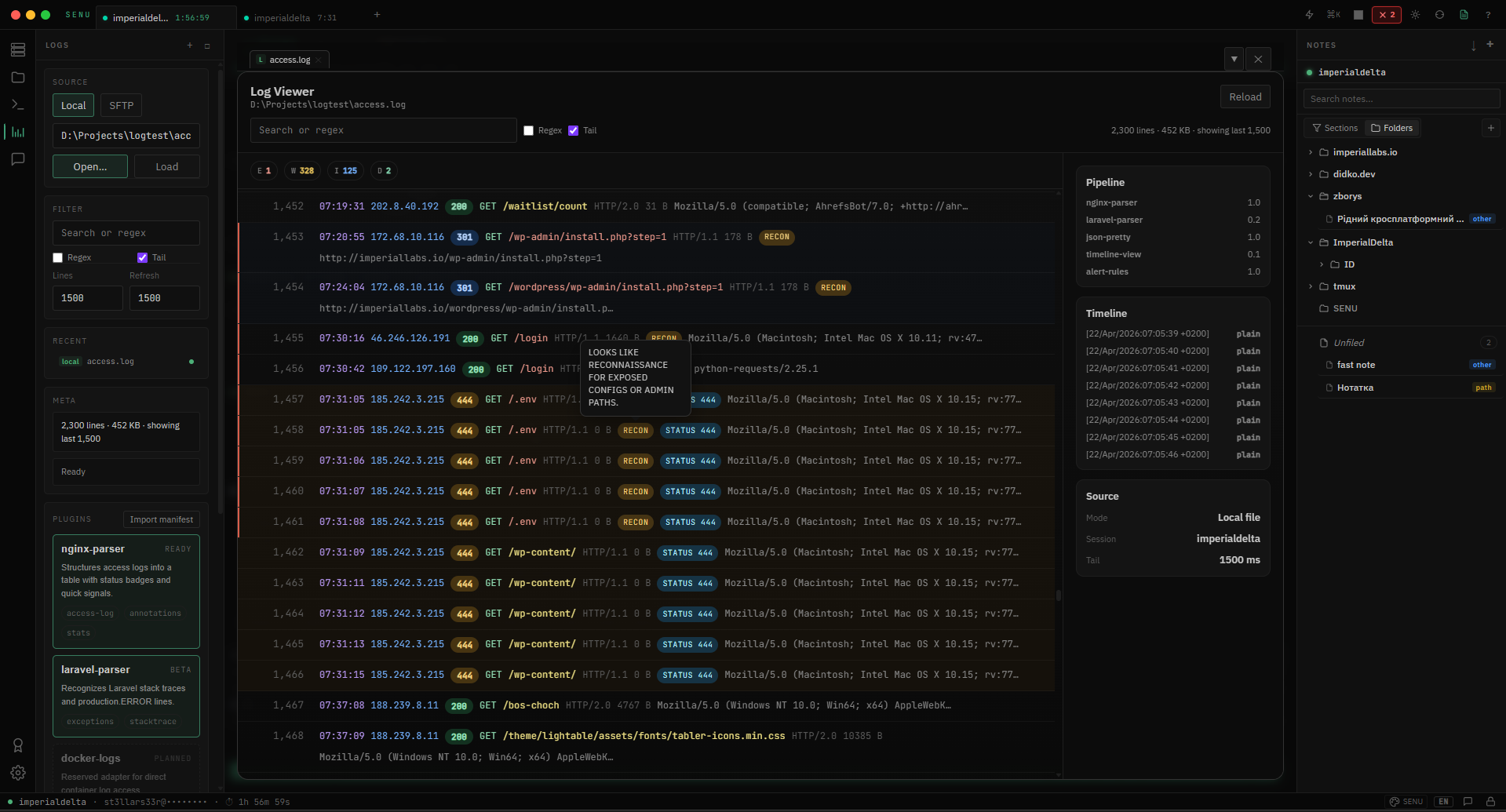
Here's the honest part: this is a working sketch, not a finished feature. The nginx-parser produces those tags on the screenshots, but I haven't validated it end-to-end against varied real-world logs. The Laravel parser is labeled BETA in the UI for a reason — it's roughed in. docker-logs and k8s-parser are explicitly PLANNED placeholders. And the most architecturally interesting piece — letting users drop in their own parsers — currently only accepts JSON definitions. The full "write a Rust/JS/whatever plugin and load it" system exists as an idea, not as a tested mechanism.
What's there demonstrates the direction. What's missing is what always seems to be missing from these things: a person who reads logs every day, runs the tool against their real infrastructure, hits the places where my assumptions are wrong, and tells me what's broken. The architecture won't become a product until that person shows up. Until then it's a well-aimed prototype.
Notes that know what server they're for
This is the most finished part of SENU, and the one I'm most willing to defend in detail.
The setup is simple to describe and surprisingly absent from every terminal I've ever used: notes live alongside connections. Open a server, your notes for it are right there. The note isn't "a markdown file somewhere on your laptop." The note knows which server it belongs to, which directories on that server it's about, which specific files it references. The metadata is part of the document.
Two entry points, depending on what you need.
Quick note — a small popup for the moment when you're mid-task and need to dump a few lines before you forget. Pick a folder, optionally add tags, save. Three seconds.
Full note — a real document editor. Paragraphs, headings (H1/H2/H3), bullet lists, ordered lists, quotes, dividers, slash-commands for inserting blocks. Folder hierarchy with drag-and-drop, tags, server bindings, file path bindings. It looks and feels like Obsidian if Obsidian knew about your infrastructure.
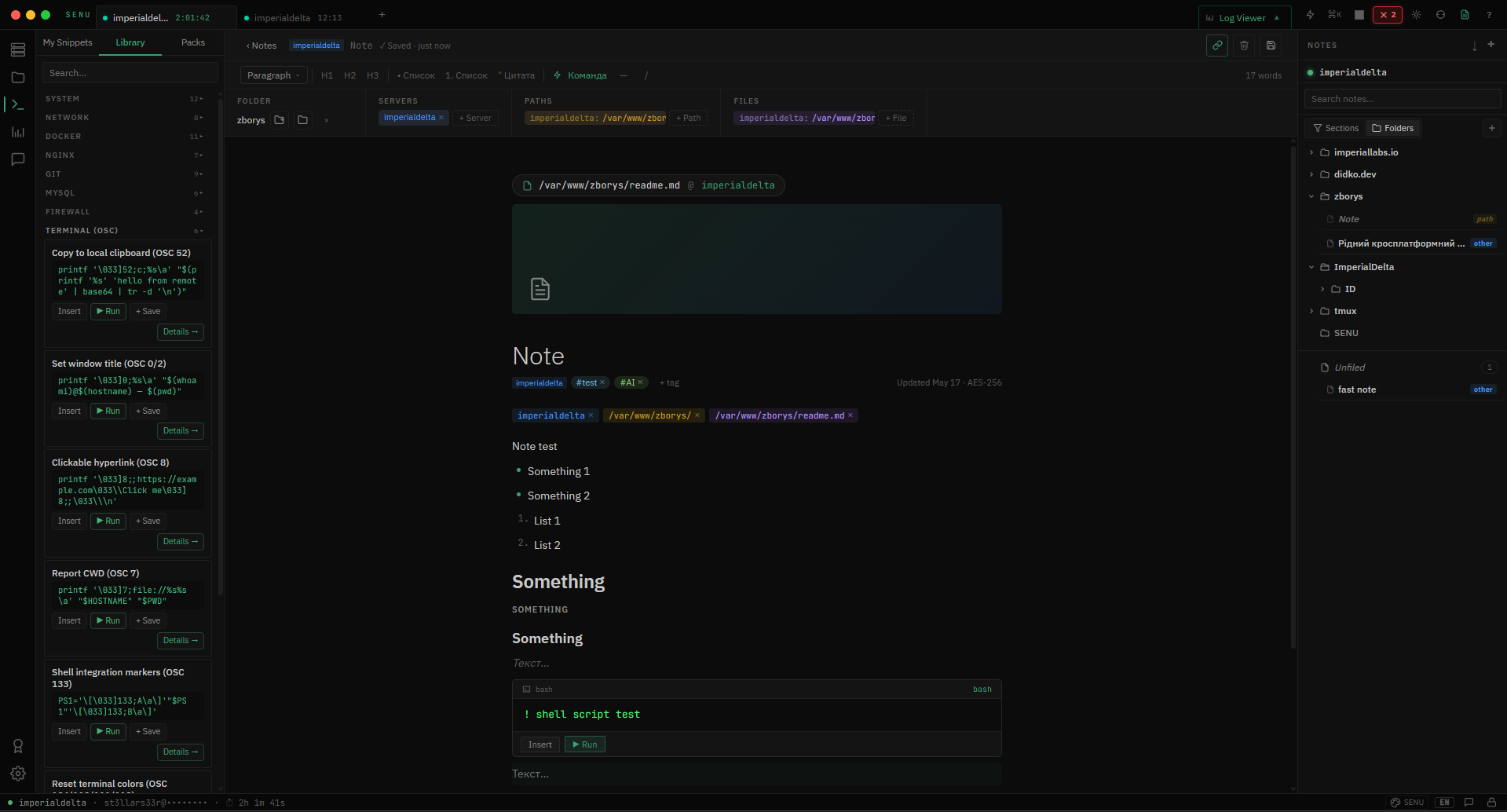
Three things make this more than a notepad.
First: notes are bound to infrastructure context. A note can be tagged with a server (imperialdelta), a directory (/var/www/zborys/), specific files (/etc/nginx.conf). When you reopen a server, you see the notes that mention it. When you're in a directory, you can find every note that references that path. This is the metadata most note-taking systems don't have and most infra-management tools don't think to add.
Second: notes can become runbooks. Inside a note, you can drop in a command block — a piece of shell script with Insert and Run buttons. Insert pastes it into your active SSH session. Run executes it right there. Build a document with five command blocks, and you have a runnable runbook with prose between the steps. The note isn't just describing the procedure. It is the procedure.
Third: notes are encrypted locally and stay local by default. AES-256 on disk. No sync to any cloud, no account, no telemetry. If you want to push a note to the server as a markdown file (for shared knowledge in a team folder, or just to keep a README.md next to your code), there's an explicit "upload to server" action with a target server picker and a destination path. You decide what leaves your machine.
This is the part of SENU that, honestly, I don't understand why doesn't already exist in every modern terminal. Once you've used a notes panel that knows which box you're SSH'd into, going back to "open Notion in another window and try to remember which doc is about which server" feels archaic.
Identity and design
Identity: deliberately quiet.
The brief I wrote for myself was unusual: SENU should not look like a product trying to be noticed. Most software identities open with words like bold, memorable, distinctive. The brief here was the opposite: SENU should feel like another open window — present, unremarkable, comfortable to have around for hours.
The shape settled into an S inside a circle.
The circle came first, and it came from a question about friendliness. Sharp forms — shards, geometric marks, anything pointed — read as cautious, alert, defensive. Circles read as safe, complete, available. SENU is something you spend hours next to, so it had to feel safe, not on guard. The circle does that work without saying anything.
The S inside the circle came after months of exploration. I ran hundreds of thousands of variations through Flux locally — different forms, different angles, different metaphors. Most directions failed for the same reason: they were trying too hard. The S worked because it didn't try. It carries motion without being kinetic, suggests cycle without closing, hints at continuity without committing to a fixed beginning or end. It feels like an entity going about its own business, not a logo demanding to be remembered.
That last part matters. SENU is meant to be something you become part of — you connect to servers, you keep notes, you watch logs, you talk to another admin, you move on. The tool exists alongside the work, not in front of it. The S-in-a-circle had to feel like that: a presence, not a performance.
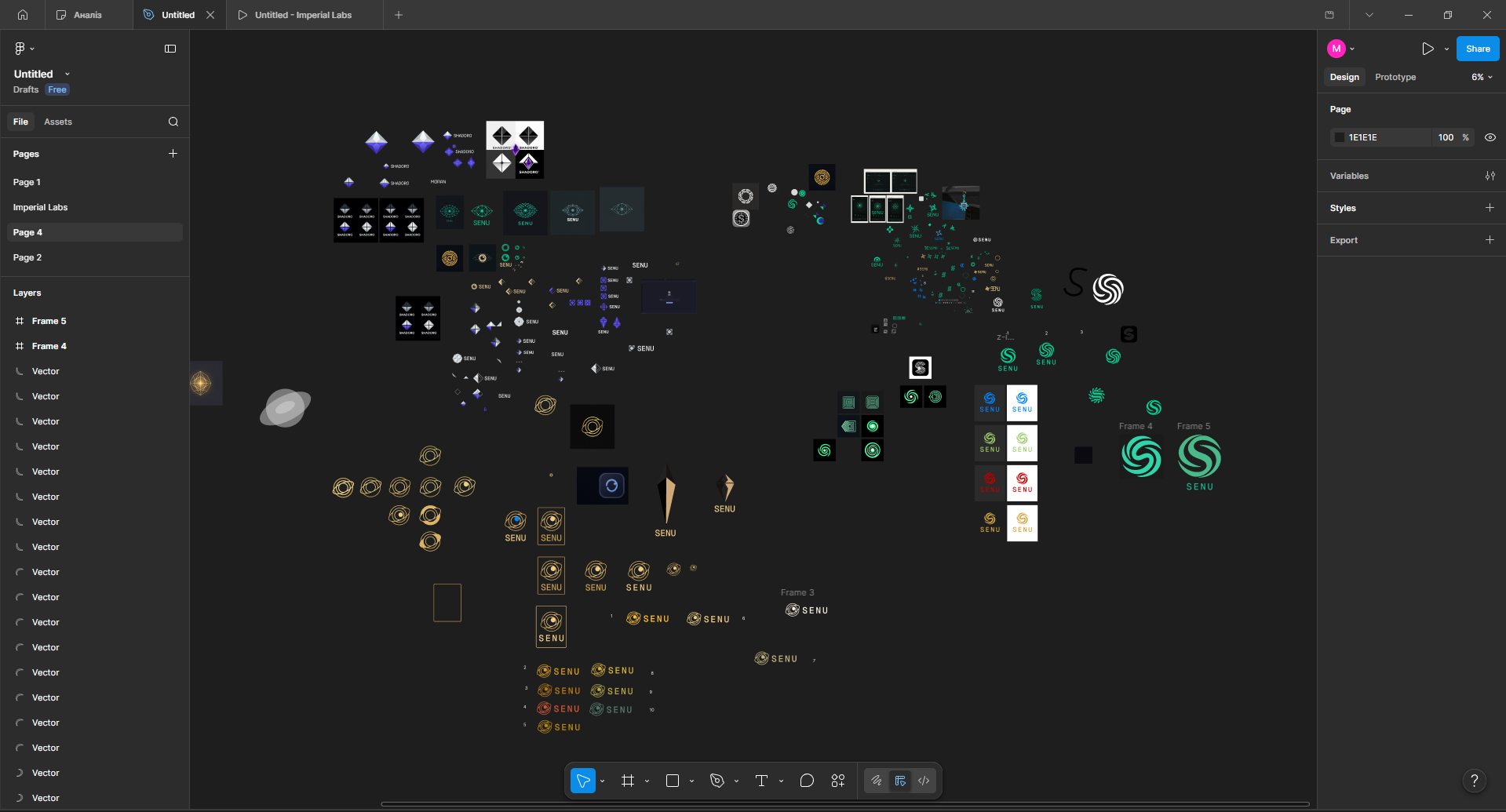
The color decision followed the same logic.
I tried a lot of palettes: warm gold, deep purples, royal blues, cool teals, several greens. Each had its own argument for why it should win. The one that survived contact with daily use was a cool, slightly muted green on a dark background. Not poison green, not neon, not lime — closer to the color of an old CRT phosphor after it's been on for a few hours. It contrasts with dark UI without screaming. It signals "active, alive" without claiming center stage.
The deeper reason was philosophical. Bright accents — the bold purples and electric blues of modern SaaS — pull attention to themselves. They want you to look at the product. SENU's color says the opposite: I'm here, I'm working, look at your servers, not at me.
That's the principle the whole identity lands on. Without the user, SENU is nothing. It sits, it watches, it waits. The user provides the motion. The user creates the accent. The tool just makes room.
What's there now
As of May 2026, v0.9.0-beta.1 is the current public release. Open source on GitHub, downloadable for the major desktop platforms.
Core features that are stable:
SSH, Telnet, Serial, Local, Docker connections
Server-bound Notes
Plugin-aware Log Viewer
In alpha:
End-to-end encrypted Chat
Whether v0.9.0 reaches stable depends on something I can't control alone — actual users putting real load on the tool and reporting back. Until that happens, I'm in a strange loop: I can't fix what I don't know is broken, and I don't know what's broken until someone breaks it. So the honest answer about "when stable" is: when it's been used by people who aren't me. Until then, beta means beta. The edges haven't been worn down by real use yet.
Lessons
A few things SENU made me understand more clearly than I did before.
Picking the right stack is half the product. Tauri over Electron didn't just save megabytes. It changed who would consider using SENU at all. Stack choices are positioning choices, not just engineering ones.
Pivoting early is cheap. Pivoting late is expensive.
I wanted to start with a paid model — annual subscriptions, a niche product. I didn't, because of a chain of obstacles. To sign builds as a professional vendor, you need an EV code signing certificate (~€500/year). To officially sell in the EU, you need a legal entity and VAT registration. To protect the product name from clones, you need a registered trademark. To set up the legal side correctly, you need a lawyer, whose services can run up to €2,000. Each of these is manageable on its own. Together they become a project parallel to the product itself.
And since this is the first product I've taken to a near-finished state, I decided to make SENU open source instead. Because if I'd gone down the route of registering a company, I wouldn't have been building software anymore — I'd have been doing paperwork.
The hardest part of building with AI isn't the writing.
AI wrote most of the SENU codebase. I spent roughly three months debugging after the AI was "done." The bugs weren't about the AI being incompetent — they were about the AI not seeing what it didn't see. SSH session handling, message ordering in encrypted chat, memory behavior in the log viewer under large files. Each one required me to sit with the problem long enough to describe it precisely. The AI typed fast. I judged.
My role in this kind of development is closer to architect and project manager than to coder — because only I know what the thing is supposed to look like at the end and what it's supposed to do. The AI doesn't. And I came to understand that the AI really is what its builders say it is: a language model, doing what you tell it to do.
You say "build me an SSH terminal" and it builds one. It doesn't know Electron or Tauri, doesn't know JS or Rust — all of that has to be said explicitly. The more concrete and detailed the task, the closer the result is to what you had in your head.
More on why models default to Electron in the first place — in a separate note: Why AI defaults to Electron.
// next project